
Finding the line that is burning your CPU
I built a shop, wrote two slow endpoints on purpose, and then went looking for them the way you would in production. One was wasted CPU in a function nobody would suspect. The other ran 200 queries per request and did not register as slow anywhere. Then I put 20 virtual users on both and got a flame graph of exactly that window. Here is which screen found which, and the file and line number each one gave me.

Every Grit project ships with Pulse mounted at /pulse/ui. People see the dashboard, nod, and never open it again, because when everything is fine a monitoring tool is a wall of green.
So let me make something not fine.
I am going to build a shop, write two slow endpoints into it deliberately, and then find them. Not by remembering where I put them. By starting from "something is slow" and following the tooling until it names a file and a line number. The two endpoints are slow in completely different ways, which is the point: one of them is invisible to the screen that catches the other. Then I am going to put twenty concurrent users on both and get a CPU profile of exactly those fifty seconds.
Everything below is a real run. Every number is copied out of the terminal or read off a screenshot taken while it was happening.
The shop
grit new slowshop --triple --next --db sqlitecd slowshopgrit generate resource Product --fields "name:string,price:money,stock:int,sku:string" --faker --count 200grit generate resource Review --fields "body:text,rating:int,product:belongs_to" --faker --count 2000grit migrategrit seed
200 products, 2000 reviews, a working admin panel and API. Now the two bad endpoints. These are not strawmen. I wrote each one the way the ticket would have described it, and neither looks wrong when you read it.
Bad endpoint one: "customers also viewed"
The merchandising team wants related products, and the only data we have is names. So: score every product against every other product by name similarity, keep the best three.
// internal/services/catalog_report.gofunc (s *CatalogReportService) Suggestions(ctx context.Context) ([]ProductSuggestions, error) {var products []models.Productif err := s.DB.WithContext(ctx).Find(&products).Error; err != nil {return nil, fmt.Errorf("loading products: %w", err)}out := make([]ProductSuggestions, 0, len(products))for _, p := range products {scored := make([]RelatedProduct, 0, len(products))for _, other := range products {if other.ID == p.ID {continue}scored = append(scored, RelatedProduct{SKU: other.Sku, Name: other.Name,Score: similarity(p.Name, other.Name),})}sort.Slice(scored, func(i, j int) bool { return scored[i].Score > scored[j].Score })if len(scored) > 3 {scored = scored[:3]}out = append(out, ProductSuggestions{SKU: p.Sku, Name: p.Name, Related: scored})}return out, nil}// similarity scores two product names from 0 to 1 by edit distance.func similarity(a, b string) float64 {a, b = normalise(a), normalise(b)// ... Levenshtein ...}// normalise lowercases a name and strips the punctuation a supplier feed// leaves in, so "Acme Widget (Blue)" and "acme widget blue" score the same.func normalise(s string) string {s = strings.ToLower(s)out := ""for _, r := range s {if (r >= 'a' && r <= 'z') || (r >= '0' && r <= '9') || r == ' ' {out += string(r)}}return strings.Join(strings.Fields(out), " ")}
If you are already pointing at the nested loop, hold that thought. You are about to be half right, and the half you are wrong about is the interesting half.
Bad endpoint two: the weekly digest
Every product, with how many reviews it has and their average rating.
out := make([]ProductDigest, 0, len(products))for _, p := range products {var reviews []models.Reviewif err := s.DB.WithContext(ctx).Where("product_id = ?", p.ID).Find(&reviews).Error; err != nil {return nil, fmt.Errorf("loading reviews for %s: %w", p.Sku, err)}total := 0for _, r := range reviews {total += r.Rating}// ... average, append ...}
That is a textbook N+1: one query for the products, then one more per product. 201 queries to answer one request.
Turning profiling on
Two switches, and deliberately two. In .env:
PULSE_PROFILING=truePULSE_MUTEX_PROFILE_FRACTION=100PULSE_BLOCK_PROFILE_RATE=10000PULSE_EXPLAIN_SLOW_QUERIES=true
and PULSE_PROFILE_ENABLED=true in the environment the server actually runs in.
Why two? A profile is an unauthenticated description of your program's internals, and a thirty-second CPU profile that anyone can request repeatedly is a denial of service. One forgotten setting should not be enough to expose that, so it takes a config value and an environment variable, and the endpoints sit behind the Pulse dashboard credentials on top.
Mutex and block profiling cost the runtime something merely to be switched on, so they are separate numbers you set deliberately. Leave PULSE_BLOCK_PROFILE_RATE=0 and ask for a block profile, and you get a 409 that names the option to add rather than an empty profile that reads as "nothing is blocking". That distinction matters more than it sounds: an empty profile is a wrong answer that looks like a right one.
Step one: which route?
Drive some traffic, open /pulse/ui, go to Routes.
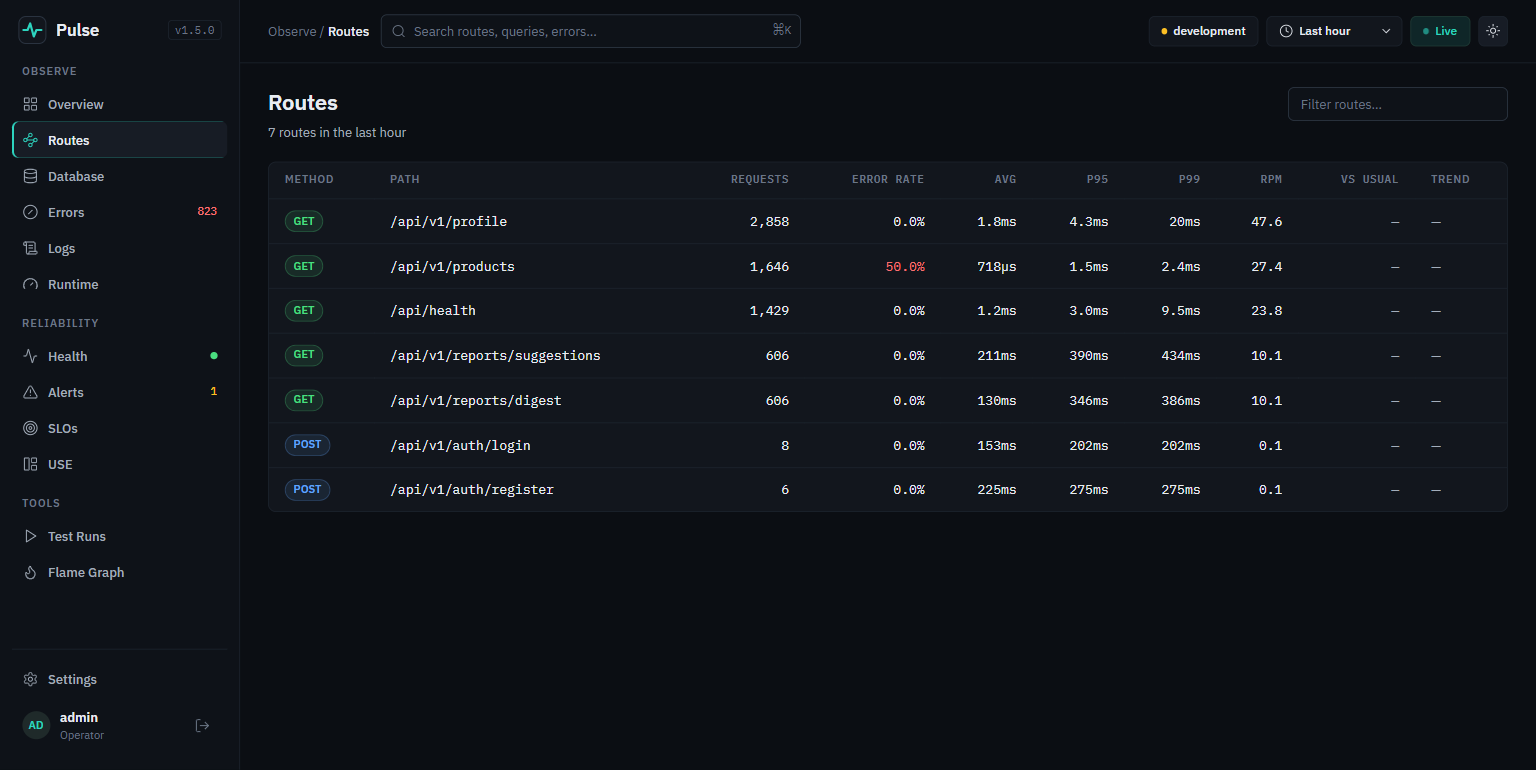 The Pulse Routes page: a table of method, path, requests, error rate, avg, p95, p99, rpm. /api/v1/reports/suggestions shows 356ms avg and 419ms p95, against 2ms for /api/v1/products
GET /api/v1/reports/digest 117 requests avg 71ms p95 92msGET /api/v1/reports/suggestions 117 requests avg 356ms p95 419msGET /api/v1/products 41 requests avg 2ms p95 2ms
There it is, in ten seconds. /products is a generated list endpoint doing real work with pagination and filtering, and it answers in 2ms. suggestions takes 178 times longer.
Note the two columns on the right, VS USUAL and TREND, both showing —. Those are the per-route baselines added in Pulse v1.3.0: once there is a week of history they show the current p95 as a ratio against what the route normally does. That is the difference between "this route is slow" and "this route got slow", and only the second one tells you to go looking at a recent deploy. On a six-minute-old process there is nothing to compare against yet, and the dashboard says so rather than inventing a number.
So: suggestions is slow. Pulse has taken me as far as the route. Now I need the line.
Step two: which line? (the CPU one)
The dashboard has a Flame Graph page. Click it, pick CPU, hit Sample:
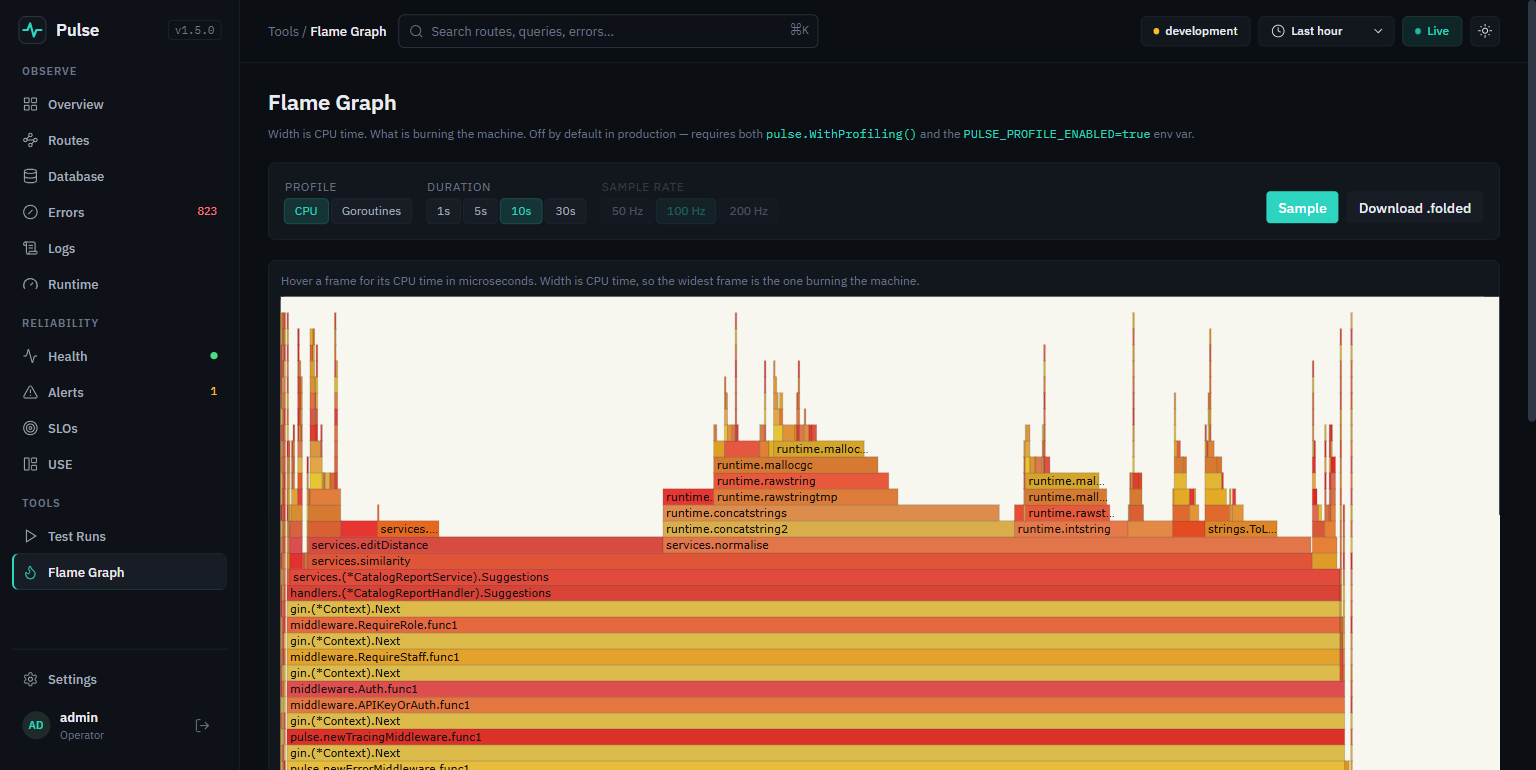 The Pulse Flame Graph page in CPU mode. The stack reads bottom-up through the gin middleware into handlers.CatalogReportHandler.Suggestions, services.similarity, and a wide tower of services.normalise into runtime.concatstrings
Read it bottom-up and the whole chain is there: the gin middleware, then handlers.(*CatalogReportHandler).Suggestions, then services.(*CatalogReportService).Suggestions, then services.similarity, and then the widest tower on the page, services.normalise opening into runtime.concatstrings and runtime.concatstring2.
That is the answer, and the page tells you how to read it: "Width is CPU time, so the widest frame is the one burning the machine."
This page was useless a day before I wrote this. It sampled goroutine stacks rather than CPU time, so a goroutine parked in a network read counted on every tick while using no CPU at all, and the widest towers were
runtime.netpollblockandnet.(*conn).Read. The hot code was a sliver you had to hunt for. I filed it and Pulse v1.5.0 added the CPU/Goroutines toggle with CPU as the default. Goroutine mode kept its own job, finding leaks and stuck workers, and now folds away parked stacks unless you ask for them.
Going from the function to the line
The flame graph names the function. For the line, pull the profile and open it in the tool Go ships with:
# authenticate onceTOKEN=$(curl -s -X POST localhost:8211/pulse/api/auth/login \-H 'Content-Type: application/json' \-d '{"username":"admin","password":"<PULSE_PASSWORD>"}' | jq -r .token)# capture 12 seconds of CPU while the thing is under loadcurl -s -H "Authorization: Bearer $TOKEN" \"localhost:8211/pulse/api/profile/cpu?seconds=12" -o cpu.pprofgo tool pprof -top -nodecount=10 cpu.pprof
Duration: 12s, Total samples = 9850ms (82.08%)flat flat% sum% cum cum%1290ms 13.10% 13.10% 1820ms 18.48% services.editDistance760ms 7.72% 20.81% 1890ms 19.19% runtime.concatstrings520ms 5.28% 26.09% 840ms 8.53% runtime.mallocgcTinySC2450ms 4.57% 30.66% 450ms 4.57% runtime.memmove310ms 3.15% 33.81% 900ms 9.14% runtime.scanObject190ms 1.93% 41.83% 3760ms 38.17% services.normalise
Read the cum column, not flat. normalise is 38.17% of all CPU in the process. The Levenshtein distance, the thing that looks expensive, is 18.48%. A function whose job is to lowercase a string and drop punctuation costs twice what the actual algorithm costs.
And runtime.concatstrings at 19.19% is the confession.
Now the move that ends the investigation:
go tool pprof -list 'normalise' cpu.pprof
ROUTINE ======== services.normalise in .../internal/services/catalog_report.go190ms 3.76s (flat, cum) 38.17% of Total. . 87:func normalise(s string) string {. 220ms 88: s = strings.ToLower(s). . 89: out := ""100ms 100ms 90: for _, r := range s {30ms 30ms 91: if (r >= 'a' && r <= 'z') || ... {50ms 2.82s 92: out += string(r). . 93: }. . 94: }10ms 590ms 95: return strings.Join(strings.Fields(out), " ")
Line 92. out += string(r). 2.82 seconds of a 9.85 second profile. One line, 28.6% of everything the process did.
That is the answer to "how would I discover which file is burning CPU". A file name, a line number, and a share of total CPU, from a running process, without a debugger and without adding a single line of instrumentation.
Strings are immutable in Go, so out += string(r) allocates a brand new string and copies the old one on every kept character. For a 30-character product name that is 30 allocations and 465 bytes copied, and the nested loop calls it 40,000 times per request.
Which brings us to the second mistake, the one the profile makes obvious and reading the code does not: the normalisation is inside the comparison. similarity(a, b) normalises both arguments on every call. With 200 products the inner loop runs 40,000 times, so it computes 40,000 normalisations to produce 200 distinct answers. Every name is normalised 400 times.
Step three: the one the profiler will never find
Now the digest endpoint. Open Database.
Stop and look at two of its numbers together:
SLOW QUERIES 0N+1 DETECTED 606
Not one single slow query. Every one of those 201 queries per request is a primary-key-indexed lookup returning ten rows in a quarter of a millisecond. No slow query log on earth will flag them. No threshold you can set will catch them, because nothing is over any threshold. The problem is not that a query is slow, it is that there are two hundred of them, and that is a fundamentally different measurement: it requires counting queries within a single request, which is something only a profiler living inside the process can do.
The N+1 detections tab, which is where this ends:
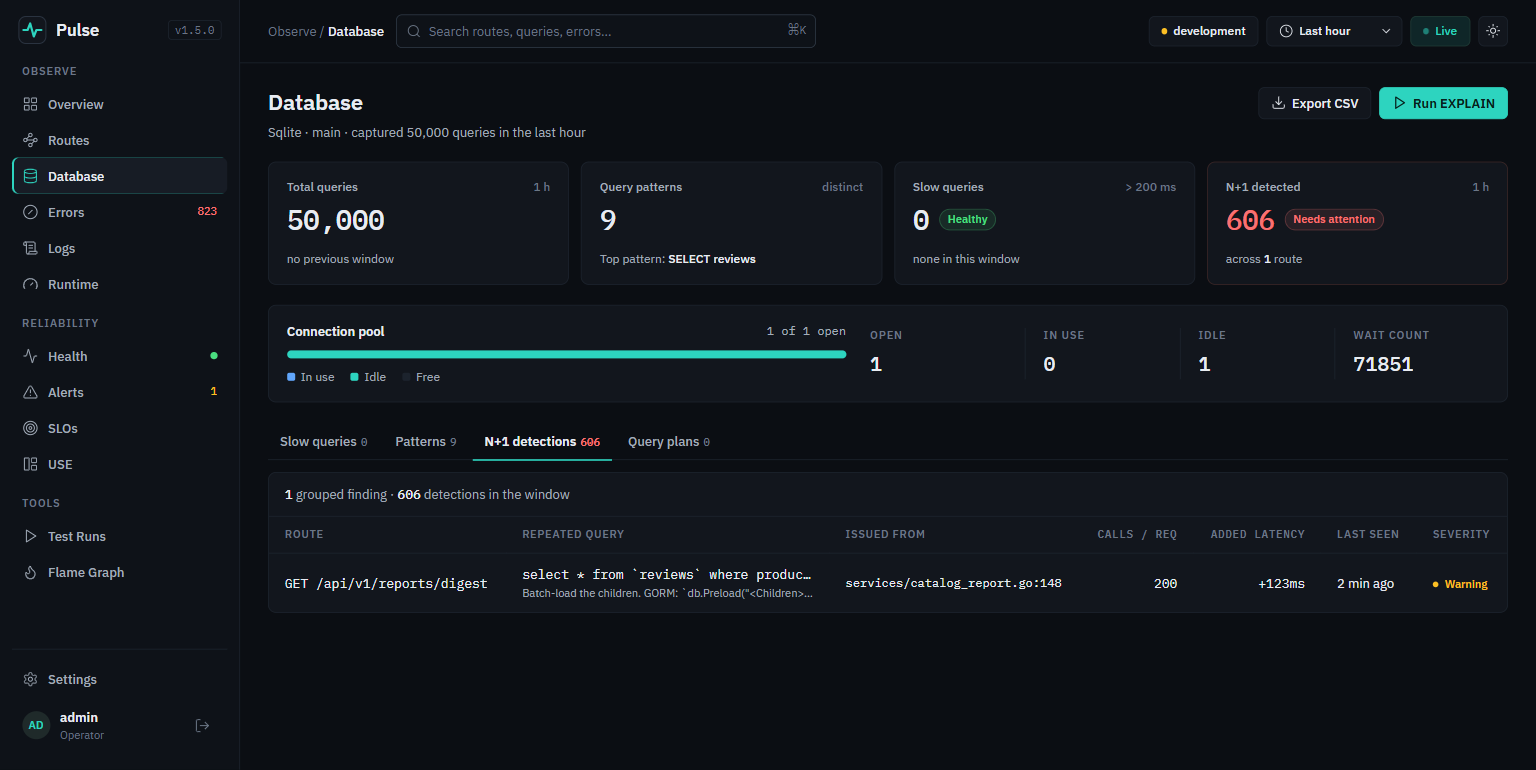 The Pulse Database page. Four tiles read Total queries 50,000, Query patterns 9, Slow queries 0 Healthy, N+1 detected 606 Needs attention. Below, the N+1 table has columns Route, Repeated query, Issued from, Calls per req, Added latency and Severity, with one row: GET /api/v1/reports/digest, select from reviews, services/catalog_report.go:148, 200 calls, +123ms
One row, and it answers every question at once:
| Route | Issued from | Calls / req | Added latency |
|---|---|---|---|
GET /api/v1/reports/digest | services/catalog_report.go:148 | 200 | +123ms |
catalog_report.go:148 is the Where("product_id = ?", p.ID) line, exactly. The suggested fix sits under the SQL: "Batch-load the children. GORM: db.Preload("<Children>")".
This column did not exist a day before I wrote this either. The table showed a SQL pattern, a repetition count and a truncated trace id, and the only way to the file was a 7MB CSV export, because Pulse recorded the caller of every query and surfaced it in exactly one place. I filed it and v1.5.0 put
caller_fileandcaller_lineon the detection, the ranked view and the query spans in a trace.
The ranked view sorts by what the problem actually costs:
{"route": "GET /api/v1/reports/digest","pattern": "select * from `reviews` where product_id = ? ...","occurrences": 41,"avg_queries_per_hit": 200,"total_duration": 2072508900,"suggested_fix": "Batch-load the children. GORM: `db.Preload(\"<Children>\").Find(&parents)`.Or build an `IN (?)` query with the parent IDs collected from the outer loop."}
41 requests, 200 queries each, 2.07 seconds of database time between them.
One honest rough edge while I am here: the Query plans tab, which runs EXPLAIN on slow queries when PULSE_EXPLAIN_SLOW_QUERIES=true, sits at zero. Correct behaviour, and a neat illustration of the same point: it is keyed on slow queries, and this problem has none.
Step four: the same thing, under load
Everything above was me hitting the endpoints by hand. The question that actually matters is what happens at twenty concurrent users, or five hundred, and that is a different measurement: contention, connection pools, and the N+1 that was merely wasteful at one request a second.
Grit generates a k6 load test:
grit generate perf --resource Product
✓ perf/load.js✓ perf/pulse.js✓ perf/README.md
The second file is the interesting one, and it is new. k6 can tell you p95 went from 40ms to 310ms at 500 VUs. It cannot tell you which function, and neither can an external APM at the resolution that matters. Pulse can, because it is inside the process. So the generated script registers the run with Pulse before the load starts and closes it after:
export function setup() {// ... mint a token ...const pulse = pulseBase(BASE);const pulseToken = pulseLogin(pulse);const run = pulseStartRun(pulse, pulseToken, {name: 'grit generate perf: 20 VUs for 30s',type: 'k6.average-load',metadata: { vus_peak: 20, hold: '30s', base_url: BASE },});return { token, staff, pulse, pulseToken, run };}export function teardown(data) {pulseEndRun(data.pulse, data.pulseToken, data.run, { completed: true });}
Run it:
set -a; source .env; set +a # PULSE_USERNAME / PULSE_PASSWORDk6 run perf/load.js
pulse: recording run 52a909962ff59a2c5bcbd812087febb2 with a CPU profile█ THRESHOLDShttp_req_duration ✓ 'p(95)<500' p(95)=347.29mshttp_req_failed ✓ 'rate<0.01' rate=0.00%Pulse recorded this run:Comparison http://localhost:8211/pulse/ui/test-runsFlame graph http://localhost:8211/pulse/api/test-runs/52a9.../profile?format=svg
What the run knows that k6 does not
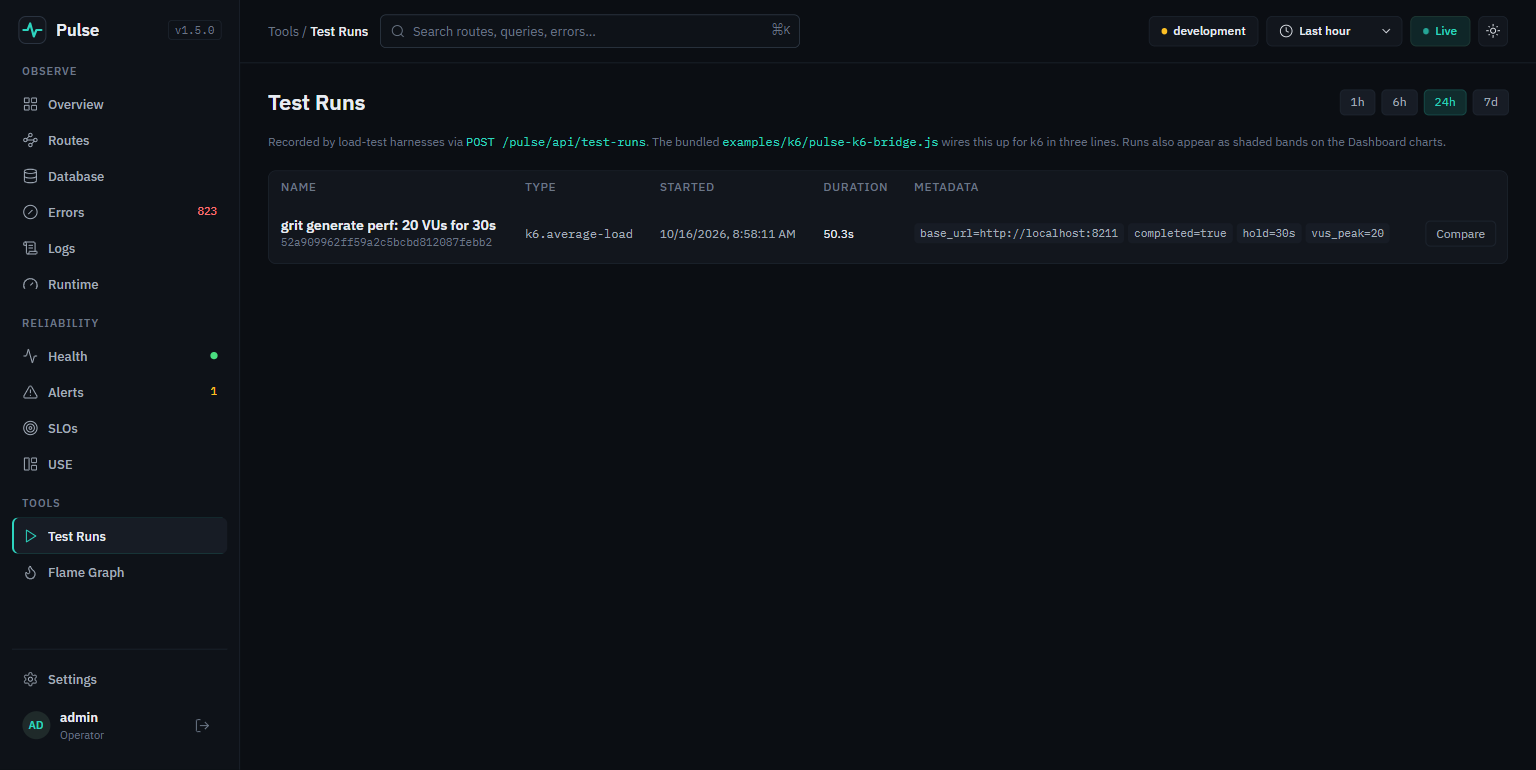 The Pulse Test Runs page. One row: "grit generate perf: 20 VUs for 30s", type k6.average-load, duration 50.3s, with metadata chips for base_url, completed, hold and vus_peak
Hit Compare:
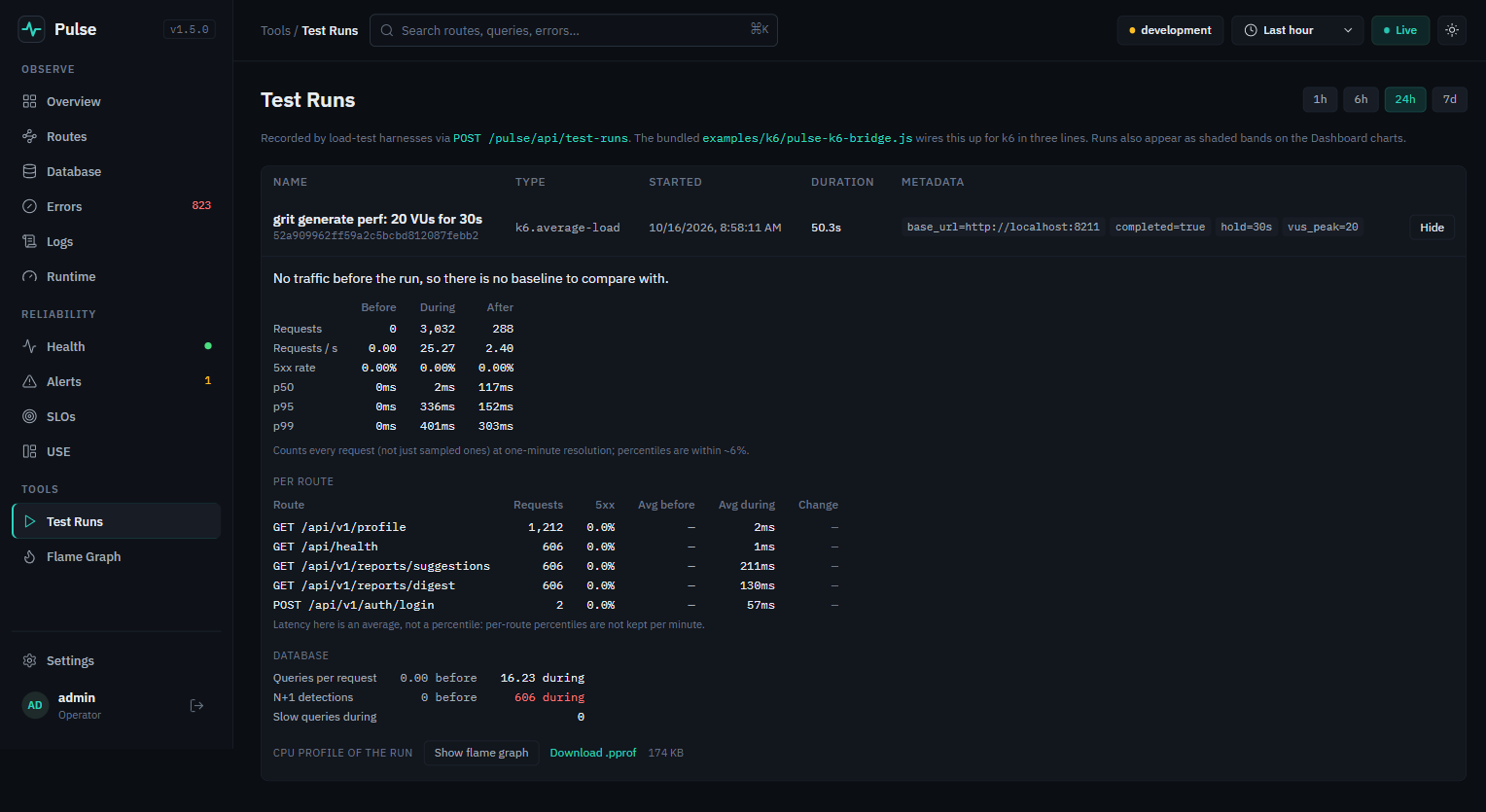 The test run comparison. Before/during/after columns show p50 2ms, p95 336ms, p99 401ms during the run. A per-route table gives avg during for each endpoint. A database block reads: queries per request 16.23 during, N+1 detections 606 during, slow queries during 0. At the bottom, "CPU profile of the run" with Show flame graph and Download .pprof, 174 KB
Three things on that screen are measured from inside the API process, and no load generator can produce any of them.
Before, during and after, from exact counts. p50 2ms, p95 336ms, p99 401ms during the run, computed from per-minute rollups that count every request rather than the ones k6 happened to sample. It also measures recovery: how long after the load stops before p95 returns within 10% of its pre-run baseline and stays there. My run has no "before" because the process was idle, and the page says so plainly rather than inventing a comparison.
Per route. A global average is dominated by whichever endpoint carried the most volume. Here /api/v1/profile took 1,212 requests at 2ms and /api/v1/reports/suggestions took 606 at 211ms, and averaging those together would have hidden exactly the thing worth seeing. The page is honest that these are averages, not percentiles, because per-route percentiles are not kept per minute. A mislabelled number would be worse.
The database block, which is the one I would put on a poster:
Queries per request 0.00 before 16.23 duringN+1 detections 0 before 606 duringSlow queries during 0
Sixteen queries per request. Six hundred and six N+1 detections. Zero slow queries. The exact signature from earlier, except now it is attached to a load test, which is where it actually costs you: 50,000 queries went to the database in fifty seconds, and 71,851 connection waits piled up behind a pool of one.
And at the bottom, CPU profile of the run, 174 KB, scoped to precisely that window:
Duration: 50.26s, Total samples = 145.81s (290.09%)flat flat% cum cum%20.55s 14.09% 30.68s 21.04% services.editDistance9.14s 6.27% 30.06s 20.62% runtime.concatstrings
Same culprit as the hand-driven profile, now with the authority of fifty seconds at twenty concurrent users behind it. Show flame graph renders it in the page; Download .pprof gives you the raw profile for go tool pprof -list.
One bug I hit wiring this up
Worth reporting because it will bite anyone who writes this integration themselves. The first run recorded nothing, and said so:
pulse: login failed (403), so this run will not be recorded
403, not 401, and the body said CSRF_INVALID. The cause is that setup() logs into the API first, which sets a session cookie, and k6 keeps one cookie jar per virtual user. So the Pulse login carried the app's session cookie, and Grit's double-submit CSRF middleware correctly refused a cookie-bearing POST with no X-CSRF-Token. The same k6 request in isolation worked fine, which is what made it confusing.
The fix is one line, and it is semantically right rather than a workaround: the Pulse dashboard authenticates with a bearer token and wants no cookies at all, so it gets an empty jar of its own.
const jar = new http.CookieJar();
The whole bridge is also fail-soft. Unset PULSE_PASSWORD, disable Pulse, point it at an unreachable host, and every call returns null and prints a warning. A load test must never fail because its observability sidecar had a bad day, and the first version of this failed silently, which is worse.
Fixing both
The N+1, replaced with one grouped query:
type agg struct {ProductID stringCount intSum int}var aggs []aggif err := s.DB.WithContext(ctx).Model(&models.Review{}).Select("product_id, count(*) as count, sum(rating) as sum").Group("product_id").Scan(&aggs).Error; err != nil {return nil, fmt.Errorf("loading review totals: %w", err)}byProduct := make(map[string]agg, len(aggs))for _, a := range aggs {byProduct[a.ProductID] = a}
201 queries become 2, and the database does the counting, which is what it is for.
The CPU one, in two parts. Hoist the normalisation out of the hot loop:
// Normalise once per product, not once per comparison. With 200 products the// inner loop runs 40,000 times, so a normalisation done inside it is done// 40,000 times to produce 200 distinct answers.norm := make([]string, len(products))for i, p := range products {norm[i] = normalise(p.Name)}// ... inner loop now calls similarityNormalised(norm[i], norm[j])
and stop building a string one allocation at a time:
func normalise(s string) string {s = strings.ToLower(s)var b strings.Builderb.Grow(len(s))// ... b.WriteRune(r) ...return b.String()}
What changed
Both numbers below come from the same k6 run, 20 virtual users for 30 seconds, read off the same Test Runs comparison. Like for like:
| before | after | |
|---|---|---|
| p95 during the run | 336ms | 100ms |
| p99 during the run | 401ms | 125ms |
digest avg | 130ms | 9ms |
suggestions avg | 211ms | 89ms |
| queries per request | 16.23 | 1.62 |
| N+1 detections | 606 | 0 |
| requests served in the window | 3,032 | 3,692 |
The N+1 fix is the dramatic one: ten times fewer queries per request, six hundred and six detections down to none, and a fifth of the latency on that endpoint. It is also the one that would have hurt most in production, where every one of those 200 queries costs a network round trip rather than a quarter of a millisecond on the same disk.
And the profile, re-taken under the same load:
Duration: 50.77s, Total samples = 79.83s (157.23%) (was 145.81s, 290.09%)flat flat% cum cum%33.39s 41.83% 45.46s 56.95% services.editDistance4.63s 5.80% 4.63s 5.80% runtime.semasleep4.52s 5.66% 4.52s 5.66% runtime.memmove
normalise has vanished from the listing entirely, and runtime.concatstrings with it. Total CPU across the same fifty seconds of the same load went from 145.81s to 79.83s, which is a little over half the machine handed back.
And now the profile tells the truth it could not tell before: editDistance is 56% of CPU. That was always the real cost of comparing 200 names against each other, it was just hidden behind a bigger, dumber problem. The remaining fix is not a micro-optimisation, it is a design decision: cache the result, compute it in a background job, or stop comparing everything to everything. Which is the right place for a profiler to leave you.
What I would actually tell you to do
Five things, in order, and the order is the whole method:
-
Routes page first. It is ten seconds and it tells you which endpoint. Everything else is wasted until you know that. Once your app has a week of history, read the VS USUAL column rather than the absolute, because "90ms" means nothing and "2.1x its baseline since Tuesday" means everything.
-
For slow: the flame graph in CPU mode, then
pprof -listfor the line. The graph names the function,-topconfirms it (read thecumcolumn, notflat), and-listputs a number on each line. Expect to be surprised about which function it is. I wrote that code an hour earlier and I would have bet on the Levenshtein distance; it was the string normaliser, at twice the cost. -
For "not slow but somehow slow": the Database page.
Slow queries 0next toN+1 detected 606is the signature of a problem no threshold will ever find, and it is overwhelmingly the most common performance bug in a CRUD application. A profiler cannot find it either, because the process is not burning CPU, it is making two hundred round trips. Read the Issued from column and you are done. -
Then put load on it, and let the run record itself.
grit generate perfwrites the k6 script and the Pulse bridge together. One command and asource .envgets you before/during/after per route, queries per request, N+1 findings for that window, and a CPU profile scoped to exactly the seconds the load was running. Guessing which of your handlers falls over first is a worse use of an afternoon than measuring it. -
Do it on your laptop before production does it to you. The digest endpoint took 71ms locally against SQLite on the same machine, which is to say it looked fine. Put a real database one network hop away, where each of those 201 queries costs a millisecond of round trip instead of a quarter of one, and the same code takes well over a second. The N+1 detector found it at 71ms, which is precisely when you want to know.
The tools are already in your project. grit new mounted them and grit generate perf wires the load test into them. The only thing standing between you and the line number is knowing which screen answers which question:
| Question | Where |
|---|---|
| Which endpoint is slow? | Routes, and the vs usual column once you have a week of history |
| Which function is burning CPU? | Flame Graph, CPU mode |
| Which line? | go tool pprof -list on the profile |
| Why is it slow when no query is slow? | Database, N+1 detections, read Issued from |
| What happens at 20x the traffic? | grit generate perf, then Test Runs → Compare |
| What was burning during that load? | The CPU profile attached to the run |
Grit is a full-stack Go and Next.js framework. grit new my-app gives you an API, an admin panel, a web app, and the observability used in this post, already wired together. Get started, or read how the observability system is designed.
Founder of Grit and author of The Daily Grit. A 5-minute morning read on building full-stack apps with Go + React.
Build it with Grit
Go + React, batteries included. Scaffold a production-ready app in one command.
Get started