Grit supports building native desktop applications with Wails. One command scaffolds a complete desktop project with Go backend, React frontend, authentication, CRUD, data export, and GORM Studio -- all compiled into a single executable.
What is Grit Desktop?
Grit Desktop extends the framework beyond web applications. Using Wails, it combines a Go backend with a React frontend (Vite + TanStack Router + TanStack Query) to produce native desktop apps for Windows, macOS, and Linux.
Terminal
$grit new-desktop myapp
This single command generates a fully working desktop application with SQLite or PostgreSQL, JWT authentication, blog and contact CRUD, PDF and Excel export, a custom title bar, dark theme, and GORM Studio for database browsing.
Install Grit
You need Go 1.26.6+, Node.js 18+, and Wails v2 installed. Then install the Grit CLI:
Terminal
# macOS / Linux
$curl -fsSL https://gritframework.dev/install.sh | sh
Grit Desktop is a hybrid app. CRUD flows through direct Wails bindings — the React frontend calls Go functions with no HTTP — while an embedded Gin REST API bound to 127.0.0.1:34999 handles native file uploads, a health endpoint, and any external clients. Both talk to the same SQLite database.
┌──────────────────────────────────────────────┐
│ Wails Window │
│ ┌────────────────┐ ┌──────────────────┐ │
│ │ React UI │ ⇄ │ Go bindings │ │
│ │ (Vite) │ │ (wailsjs/go) │ │
│ └────────────────┘ └────────┬─────────┘ │
│ │ │ │
│ │ uploads / health │ CRUD │
│ ▼ ▼ │
│ ┌────────────────┐ ┌──────────────────┐ │
│ │ Embedded Gin │─────▶│ SQLite (app.db) │ │
│ │ API :34999 │ │ offline-first │ │
│ └────────────────┘ └──────────────────┘ │
└──────────────────────────────────────────────┘
The React frontend calls Go functions directly, with Wails handling the bridge between the two runtimes.
1
Go Backend (Wails Bindings + Embedded API)
Business logic lives in Go structs. Methods on the App struct are exposed to the frontend via Wails bindings for CRUD, while an embedded Gin REST API on 127.0.0.1:34999 serves uploads, health, and external clients.
2
React Frontend (Vite)
A Vite-powered React app with TanStack Router (file-based routing) and TanStack Query for state management. Calls Go functions through the generated Wails bindings.
3
SQLite / PostgreSQL
GORM handles the database layer. SQLite is the default for portable desktop apps. PostgreSQL is supported for networked setups.
4
Single Binary Output
The entire application -- Go backend, React frontend, and all assets -- compiles into a single executable that you distribute.
Routing with TanStack Router
Grit Desktop uses TanStack Router with file-based routing. Instead of declaring routes in a centralized file, each page is a self-contained route file in the routes/ directory. The TanStack Router Vite plugin automatically discovers route files and generates a type-safe route tree at build time.
1
File-Based Routes
Each page is a file in routes/_layout/. The filename determines the URL: blogs.index.tsx maps to /blogs, blogs.$id.edit.tsx maps to /blogs/:id/edit. No route registry to maintain.
2
Type-Safe Navigation
Route params, search params, and navigation are fully typed. Route.useParams() returns typed params scoped to the current route. navigate({ to: "/blogs/$id/edit", params: { id } }) is validated at compile time.
3
Pathless Layouts
The _layout.tsx file creates a layout route (auth guard + sidebar) without adding a URL segment. All pages inside _layout/ inherit this wrapper automatically.
4
Zero-Config for Generation
When grit generate resource creates a new resource, it simply creates route files. No imports to add, no route registry to update. Deleting a resource just deletes the files.
TanStack Router uses createHashHistory() for desktop apps, so routes work correctly when the app is loaded from disk (no web server needed). The Vite plugin generates routeTree.gen.ts automatically — this file is gitignored and regenerated on every build.
myapp — desktop
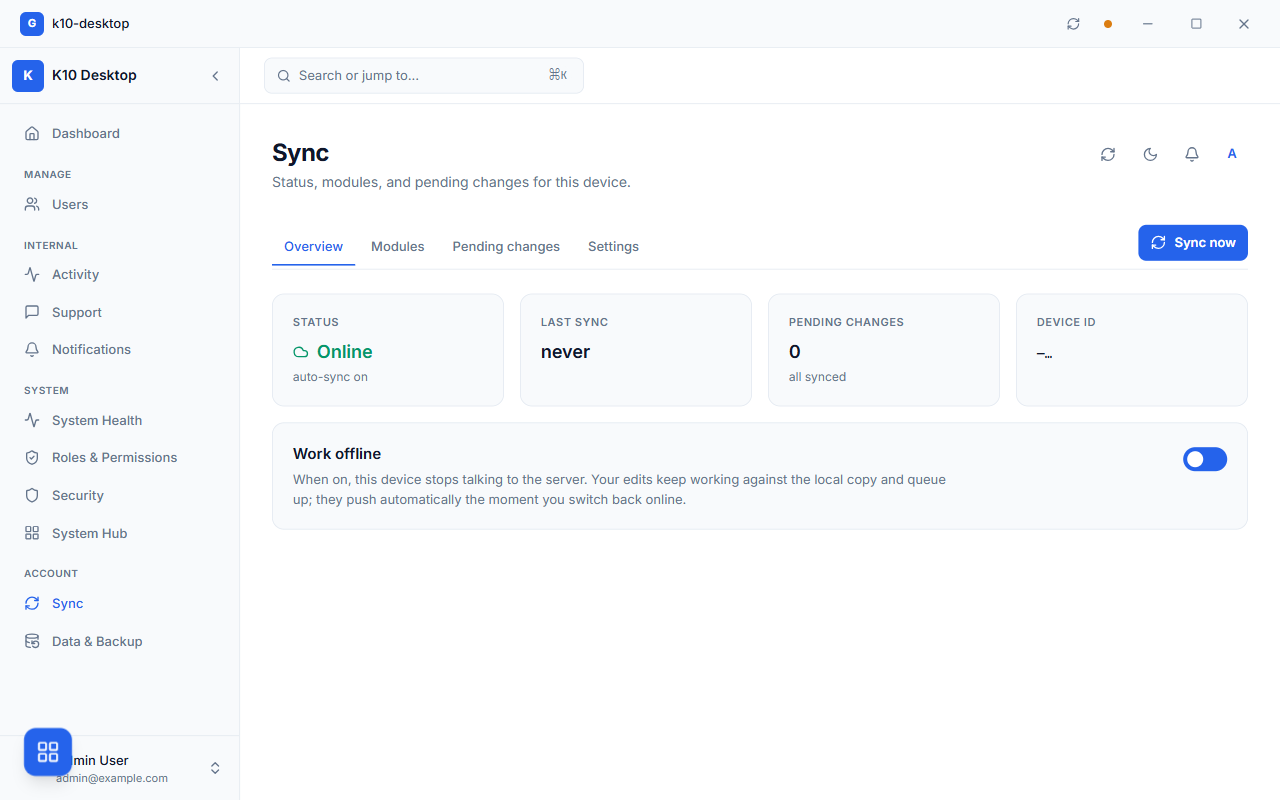
The sync surface in a generated desktop app. Reads are answered from a local SQLite mirror, writes queue while offline and push when the connection returns; the Work offline switch lets you exercise that path deliberately rather than by unplugging your router.Built-in Features
Every scaffolded desktop project includes the following out of the box:
AuthenticationRegister and login with JWT tokens and bcrypt password hashing
Blog CRUDFull create, read, update, delete for blog posts with rich text
Contact CRUDContact management with form validation and search
PDF ExportExport data tables to styled PDF documents
Excel ExportExport data to .xlsx spreadsheets
GORM StudioBuilt-in database browser at localhost:8080/studio
Custom Title BarFrameless window with custom drag region and window controls
Dark ThemeGrit dark theme with Tailwind CSS and shadcn/ui components
Resource GenerationGenerate new resources with grit generate resource
Toast NotificationsUser feedback with sonner toast notifications
Native File UploadsUpload files through the embedded REST API on 127.0.0.1:34999, stored as FileRef records
In-App Auto-UpdateBackground update checks with in-app download and install of new releases
Installer Packaginggrit package builds a distributable NSIS installer (.exe) on Windows
Web vs Desktop
Both modes share Grit conventions (GORM models, code generation, Studio), but the runtime and distribution model are different.