
Authentication
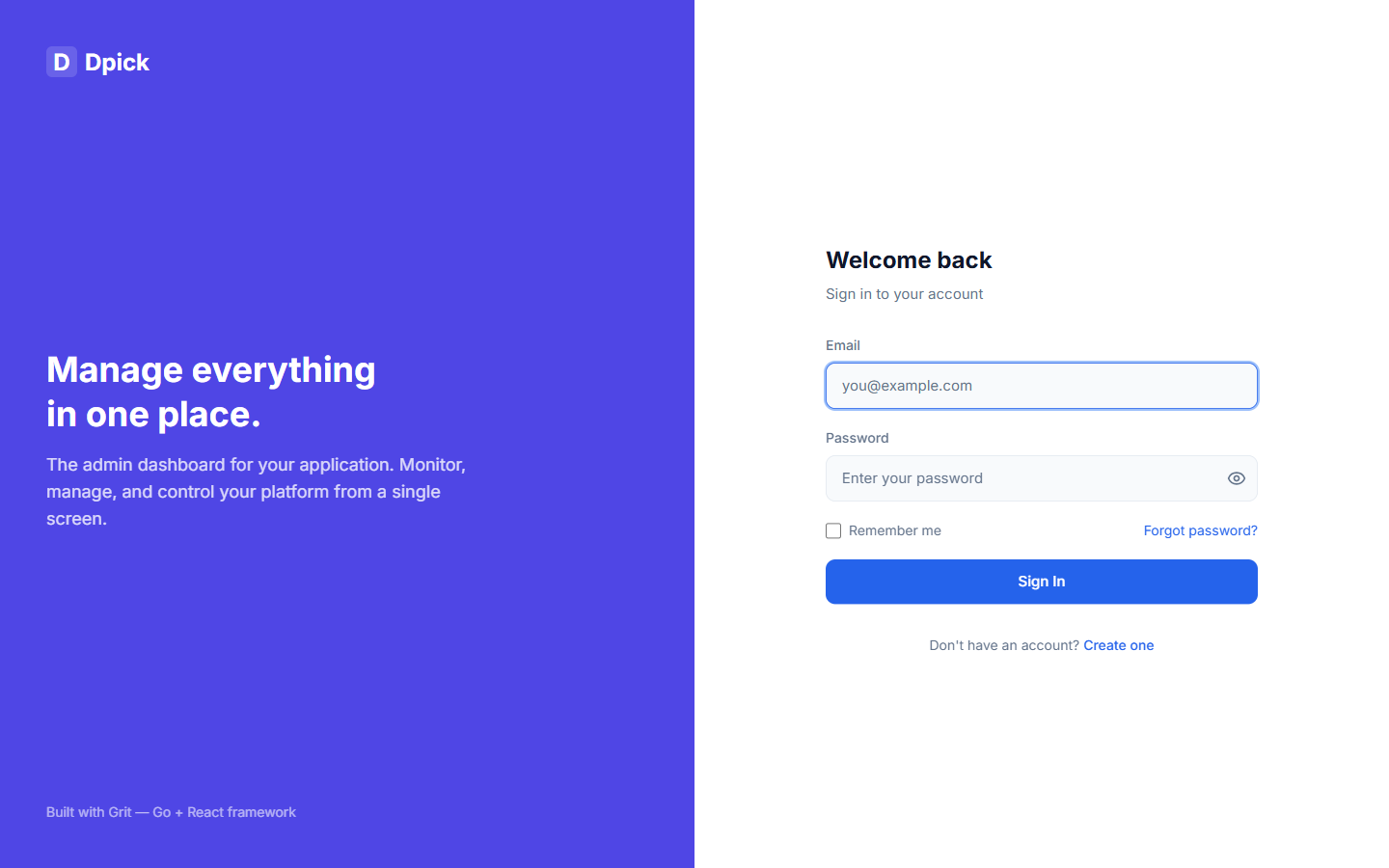
Grit ships with a complete JWT-based authentication system. It includes register, login, token refresh, logout, password reset, role-based access control, and two-factor authentication (TOTP) with backup codes and trusted devices -- all pre-configured and ready to use.
Authentication Flow
Grit uses a dual-token JWT strategy: a short-lived access token for API requests and a long-lived refresh token for obtaining new access tokens without re-authenticating.
Client Grit API| || POST /api/auth/register || { first_name, last_name, || email, password } || -------------------------------->|| | Hash password (bcrypt)| | Create user in DB| | Generate access + refresh tokens| { user, tokens } || <--------------------------------|| || GET /api/posts || Authorization: Bearer <access> || -------------------------------->|| | Validate JWT| | Load user from DB| { data: [...] } || <--------------------------------|| || --- access token expires --- || || POST /api/auth/refresh || { refresh_token } || -------------------------------->|| | Validate refresh token| | Generate new token pair| { tokens } || <--------------------------------|| |
JWT Tokens
Grit generates two JWT tokens on login/register. Both are signed with HMAC-SHA256 using the JWT_SECRET environment variable.
| Token | Default Expiry | Purpose |
|---|---|---|
| access_token | 15 minutes | Sent with every API request in the Authorization header |
| refresh_token | 7 days (168h) | Used to get a new access token when it expires |
Configure token expiry via environment variables:
JWT_SECRET=your-super-secret-key-at-least-32-charsJWT_ACCESS_EXPIRY=15mJWT_REFRESH_EXPIRY=168h
Token Claims (JWT Payload)
Each token contains these claims:
type Claims struct {UserID string `json:"user_id"`Email string `json:"email"`Role string `json:"role"`jwt.RegisteredClaims // jti, exp, iat}
Every token carries a unique jti. Without it, two tokens minted for the same user in the same second would be byte-identical — same claims, same second-resolution exp, same signing key — and two devices would end up sharing one refresh token, indistinguishable and impossible to revoke separately. See Sessions & Revocation.
Auth Endpoints
All auth endpoints are mounted at /api/auth. Register, login, refresh, and forgot/reset-password are public. Me and logout require authentication.
| Method | Endpoint | Auth | Description |
|---|---|---|---|
| POST | /api/auth/register | No | Create a new user account |
| POST | /api/auth/login | No | Authenticate and get tokens |
| POST | /api/auth/refresh | No | Get new tokens with refresh token |
| GET | /api/auth/me | Yes | Get current authenticated user |
| POST | /api/auth/logout | Yes | Invalidate user session |
| POST | /api/auth/forgot-password | No | Request a password reset link |
| POST | /api/auth/reset-password | No | Reset password with token |
| POST | /api/auth/verify-email/send | Yes | Send (or resend) a verification email |
| POST | /api/auth/verify-email | No | Verify an address with the emailed token |
Email Verification
Registration sends a verification email and the admin shows a banner until the address is confirmed. Both endpoints are in the table above.
It is modelled on password reset on purpose: the same single-use token, stored only as a SHA-256 hash, invalidating any earlier one for that user. The token also records the address it was issued for, so changing your email before clicking the link does not verify the new one.
// Request{"token": "the token from the emailed link"}// Response 200{"data": { "email_verified_at": "2026-08-16T09:30:00Z" },"message": "Email verified"}
Verification is not a gate by default. Turning it into one is a middleware decision you make per route, not a switch, because the right answer differs between an internal tool and a public signup, and a framework that guessed would lock out the first admin account it ever created.
API Keys
The JWT flow is built for a person at a browser: short-lived access tokens, a refresh cookie, rotation, revocation on password change. A cron job on someone else's server wants none of that. It wants one long-lived credential it can put in a header, which is what an API key is.
| Method | Endpoint | Description |
|---|---|---|
| GET | /api/api-keys | List your keys (prefix and metadata only) |
| POST | /api/api-keys | Issue a key. The secret is returned once |
| DELETE | /api/api-keys/:id | Revoke a key |
Manage them at Settings, API Keys in the admin. Present a key on either header:
curl https://api.example.com/api/v1/products \-H "X-API-Key: grit_a1b2c3d4_9f8e..."# Authorization: Bearer works too, for OpenAPI clients that only speak thatcurl https://api.example.com/api/v1/products \-H "Authorization: Bearer grit_a1b2c3d4_9f8e..."
A key is grit_<prefix>_<secret>. The prefix is stored in clear and indexed, so verifying a key is one indexed lookup rather than a scan comparing hashes against every row. Only the secret's SHA-256 is stored, which is why the full key is shown exactly once and cannot be recovered afterwards.
SHA-256 rather than bcrypt, deliberately. This is a 256-bit random secret, not a human password, so there is nothing to brute-force, and bcrypt's cost would land on every single API request rather than on a login.
Keys carry scopes, which are the same permission strings roles grant. Authorisation has one vocabulary rather than two, so a key scoped to products.read is checked by the same middleware that checks a user with that permission.
Register
// Request{"first_name": "John","last_name": "Doe","email": "john@example.com","password": "securepassword123"}// Response (201 Created){"data": {"user": {"id": "9b1deb4d-3b7d-4bad-9bdd-2b0d7b3dcb6d","first_name": "John","last_name": "Doe","email": "john@example.com","role": "USER","avatar": "","active": true,"email_verified_at": null,"created_at": "2026-02-11T10:00:00Z","updated_at": "2026-02-11T10:00:00Z"},"tokens": {"access_token": "eyJhbGciOiJIUzI1NiIs...","refresh_token": "eyJhbGciOiJIUzI1NiIs...","expires_at": 1707649200}},"message": "User registered successfully"}
Login
// Request{"email": "john@example.com","password": "securepassword123"}// Response (200 OK){"data": {"user": { ... },"tokens": {"access_token": "eyJhbGciOiJIUzI1NiIs...","refresh_token": "eyJhbGciOiJIUzI1NiIs...","expires_at": 1707649200}},"message": "Logged in successfully"}// Error (401 Unauthorized){"error": {"code": "INVALID_CREDENTIALS","message": "Invalid email or password"}}
Refresh Token
// Request{"refresh_token": "eyJhbGciOiJIUzI1NiIs..."}// Response (200 OK){"data": {"tokens": {"access_token": "eyJhbGciOiJIUzI1NiIs...","refresh_token": "eyJhbGciOiJIUzI1NiIs...","expires_at": 1707650100}},"message": "Token refreshed successfully"}
Forgot Password
// Request{"email": "john@example.com"}// Response (200 OK) -- always returns success for security{"message": "If an account with that email exists, a password reset link has been sent"}
The forgot-password endpoint always returns a success message regardless of whether the email exists. This prevents email enumeration attacks.
Reset Password
// Request{"token": "abc123def456...","password": "newSecurePassword456"}// Response (200 OK){"message": "Password reset successfully"}
Auth Middleware Usage
Apply the Auth middleware to any route group that requires authentication. See the Middleware page for the full implementation.
// Protected routes -- any authenticated userprotected := r.Group("/api")protected.Use(middleware.Auth(db, authService)){protected.GET("/auth/me", authHandler.Me)protected.POST("/auth/logout", authHandler.Logout)protected.GET("/posts", postHandler.List)}// Admin routes -- admin role requiredadmin := r.Group("/api")admin.Use(middleware.Auth(db, authService))admin.Use(middleware.RequireRole("ADMIN")){admin.GET("/users", userHandler.List)admin.DELETE("/users/:id", userHandler.Delete)}
Role-Based Access Control
Grit defines three built-in roles. You can extend these by adding new constants to the User model.
| Role | Constant | Access Level |
|---|---|---|
| ADMIN | models.RoleAdmin | Full access to all resources, user management, admin panel |
| EDITOR | models.RoleEditor | Can create and edit content, limited admin access |
| USER | models.RoleUser | Default role, can access own data only |
// Built-in rolesconst (RoleAdmin = "ADMIN"RoleEditor = "EDITOR"RoleUser = "USER")// Add custom roles:const (RoleManager = "MANAGER"RoleModerator = "MODERATOR")
Token Storage on the Frontend
Do not store tokens in localStorage for the web client. Anything readable from JavaScript is reachable by any XSS vector — a compromised npm dependency, a stored XSS bug in a comment field, or a browser extension. Tokens in localStorage are persistent, unscoped, and exfiltrate-able with a single line of script. The OWASP guidance (and ours) is to put auth cookies out of JavaScript's reach.
Pick the storage model that matches your client:
| Client | Token storage | Why |
|---|---|---|
| Web (Next.js) | httpOnly, Secure, SameSite=Lax cookies set by the API | XSS cannot read them; the browser attaches them automatically. |
| Mobile (Expo) | expo-secure-store (iOS Keychain / Android Keystore) | Hardware-backed, not readable by other apps or React Native bridges. |
| Desktop (Wails) | OS keychain via Go binding (keyring) | Same threat model as mobile; never the renderer. |
Web: cookies set by the API
This is on by default. Every Grit project scaffolded with v3.25.3+ already sets grit_access + grit_refresh on Login / Register / Refresh / TOTP-verify and clears them on Logout. The middleware.Auth chain reads cookies first and falls back to the Authorization header for native bearer clients. You don't have to wire any of this yourself.
The API sets two cookies on login/register/refresh: grit_access (short-lived) and grit_refresh (long-lived, scoped to /api/v1/auth). Both are HttpOnly so JavaScript cannot read them, Secure on HTTPS so they only travel over TLS, and SameSite=Lax so the CSRF surface is limited to top-level navigations.
Helpers live on the auth service for use in your own handlers:
// SetAuthCookies writes the token pair as HttpOnly cookies.// Called from Register / Login / Refresh / TOTP verify.func (s *AuthService) SetAuthCookies(c *gin.Context, pair *TokenPair) { ... }// ClearAuthCookies expires both cookies. Called from Logout.func (s *AuthService) ClearAuthCookies(c *gin.Context) { ... }
The auth middleware reads cookies first, then the Authorization header — samemiddleware.Auth(db, authService) covers both flows:
token := ""if cookieValue, err := c.Cookie("grit_access"); err == nil && cookieValue != "" {token = cookieValue} else if authHeader := c.GetHeader("Authorization"); authHeader != "" {// Bearer fallback for native mobile / desktop clientsparts := strings.SplitN(authHeader, " ", 2)if len(parts) == 2 && parts[0] == "Bearer" {token = parts[1]}}
The Next.js client doesn't touch tokens at all — the browser handles them. Use credentials: 'include' on every request:
import axios from 'axios'const api = axios.create({baseURL: process.env.NEXT_PUBLIC_API_URL || 'http://localhost:8080',withCredentials: true, // <- the browser sends grit_access / grit_refresh automatically})// Auto-refresh on 401 — note: no token reading, no localStorage.api.interceptors.response.use((response) => response,async (error) => {const originalRequest = error.configif (error.response?.status === 401 && !originalRequest._retry) {originalRequest._retry = truetry {// The browser sends grit_refresh; the API sets a new grit_access cookie.await api.post('/api/auth/refresh')return api(originalRequest)} catch {window.location.href = '/login'}}return Promise.reject(error)},)export default api
CSRF is on by default for the cookie flow. Cookie-auth APIs are vulnerable to CSRF (a malicious site forging a state-changing request from a logged-in user). The scaffolded middleware.AutoCSRF() is wired globally and enforces a double-submit CSRF token only when the request carries the grit_access cookie. Bearer-token requests (mobile / desktop) pass through with no header required — they aren't CSRF-vulnerable because browsers never auto-send a Bearer header across origins.
The SPA reads the token from the grit_csrf cookie (which is not HttpOnly, so JS can read it) and echoes it back in the X-CSRF-Token header. With Axios:
import axios from 'axios'const api = axios.create({baseURL: process.env.NEXT_PUBLIC_API_URL,withCredentials: true,})// Echo the CSRF token from grit_csrf cookie into the X-CSRF-Token header.// The middleware accepts this on every cookie-authenticated mutation.api.interceptors.request.use((config) => {const m = document.cookie.match(/(?:^|; )grit_csrf=([^;]+)/)if (m) config.headers['X-CSRF-Token'] = decodeURIComponent(m[1])return config})export default api
The first GET request (any GET) seeds the cookie; subsequent mutations carry the header. No bootstrap endpoint needed.
Mobile + Desktop: bearer header from secure store
Native clients can't use HttpOnly cookies cleanly across all platforms. Use the secure OS-backed store and the Authorization: Bearer header path:
import * as SecureStore from 'expo-secure-store'const ACCESS = 'grit_access'const REFRESH = 'grit_refresh'export const saveTokens = async (access: string, refresh: string) => {await SecureStore.setItemAsync(ACCESS, access)await SecureStore.setItemAsync(REFRESH, refresh)}export const loadTokens = async () => ({access: await SecureStore.getItemAsync(ACCESS),refresh: await SecureStore.getItemAsync(REFRESH),})export const clearTokens = async () => {await SecureStore.deleteItemAsync(ACCESS)await SecureStore.deleteItemAsync(REFRESH)}
The Authorization header path on the API stays for these clients. Desktop (Wails) uses an equivalent OS-keychain binding from Go and exposessaveTokens / loadTokens to the React frontend via Wails bindings.
Summary — never use localStorage for tokens
- Web: HttpOnly cookies (default-on). No JS touches the access token. CSRF is auto-enforced via
AutoCSRF(). - Mobile:
expo-secure-store+ bearer header. - Desktop: OS keychain + bearer header.
- Never:
localStorage/sessionStoragefor auth tokens.
Defence-in-depth — what else is on by default
- SecurityHeaders middleware — strict CSP (no inline script), X-Frame-Options DENY, X-Content-Type-Options nosniff, Referrer-Policy strict-origin-when-cross-origin, Permissions-Policy locking down camera / mic / geolocation / payments / USB, COOP + CORP for Spectre isolation, and HSTS on HTTPS. Globally applied.
- Sentinel AuthShield — brute-force lockout on
/api/auth/loginwith progressive backoff. Default-on whenever the Sentinel suite is enabled (which it is by default in fresh scaffolds). - Sentinel rate limiting — 5 requests / 15 minutes per IP on
/api/auth/loginand 3 / 15 min on/api/auth/registerin production. Dev gets relaxed limits so testing doesn't lock you out. - WAF — Sentinel runs in block mode in production, log mode in dev. Catches injection patterns at the edge before they reach handlers.
- safefetch package — use
safefetch.Clientfor any URL the user supplies (webhooks, OG-image preview, OEmbed expansion). Blocks private IP ranges + cloud metadata hostnames and re-validates the resolved IP at TCP-connect time to defeat DNS rebinding.
Sessions & Revocation
A JWT is self-contained: once signed, it stays valid until it expires and nothing the server does can take it back. That is acceptable for a short-lived access token and unacceptable for the refresh token behind it — it would make “log out this laptop”, “sign out everywhere”, and “kill every session when the password changes” impossible.
So every refresh token Grit issues is backed by a sessions row. The token itself is never stored — only its SHA-256 — so a dump of that table cannot be replayed as a login.
Rotation and replay detection
Every call to /api/auth/refresh rotates the refresh token: the row records the new hash and keeps the previous one. If a token that has already been rotated is presented again, that is the signature of theft — the attacker and the legitimate user cannot both hold the current token, so whoever refreshes second presents a stale one. Grit revokes the whole session rather than refreshing it, which surfaces the compromise instead of silently letting both parties share the account.
This does log the real user out too. That is the intended trade-off: one re-authentication beats an undetected intruder riding along.
Two timeouts
- Idle —
services.SessionIdleTimeout(default 7 days). No refresh within the window and the session dies. - Absolute —
services.SessionAbsoluteTimeout(default 30 days). The session dies at this age no matter how actively it is used.
Most apps ship one; auditors ask for both. Override either at startup:
services.SessionIdleTimeout = 24 * time.Hourservices.SessionAbsoluteTimeout = 7 * 24 * time.Hour
Endpoints
| Method | Path | What it does |
|---|---|---|
GET | /api/auth/sessions | The caller's live sessions, newest activity first. The one making the request is flagged current: true. |
DELETE | /api/auth/sessions/:id | Revoke one device. Scoped to the owner — another user passing your session id gets a 404. |
POST | /api/auth/sessions/revoke-all | Sign out of every other device, keeping the current one. |
A revoked session's next refresh returns 401 with code SESSION_REVOKED and its auth cookies are cleared.
Native clients: mobile and desktop apps send the refresh token in the request body rather than a cookie, so every session behaves identically — but current comes back false for all of them, since the server recognises “this device” by the grit_refresh cookie. If you build a sessions screen in a native app, track the session id you got at login instead.
Changing a password signs out every device
PUT /api/profile with a password field revokes every session for that user and immediately issues the caller a fresh one — so the person who changed the password stays signed in and everyone else is out. That is the behaviour you want after a suspected compromise, and it happens without any extra call.
The Active Sessions screen
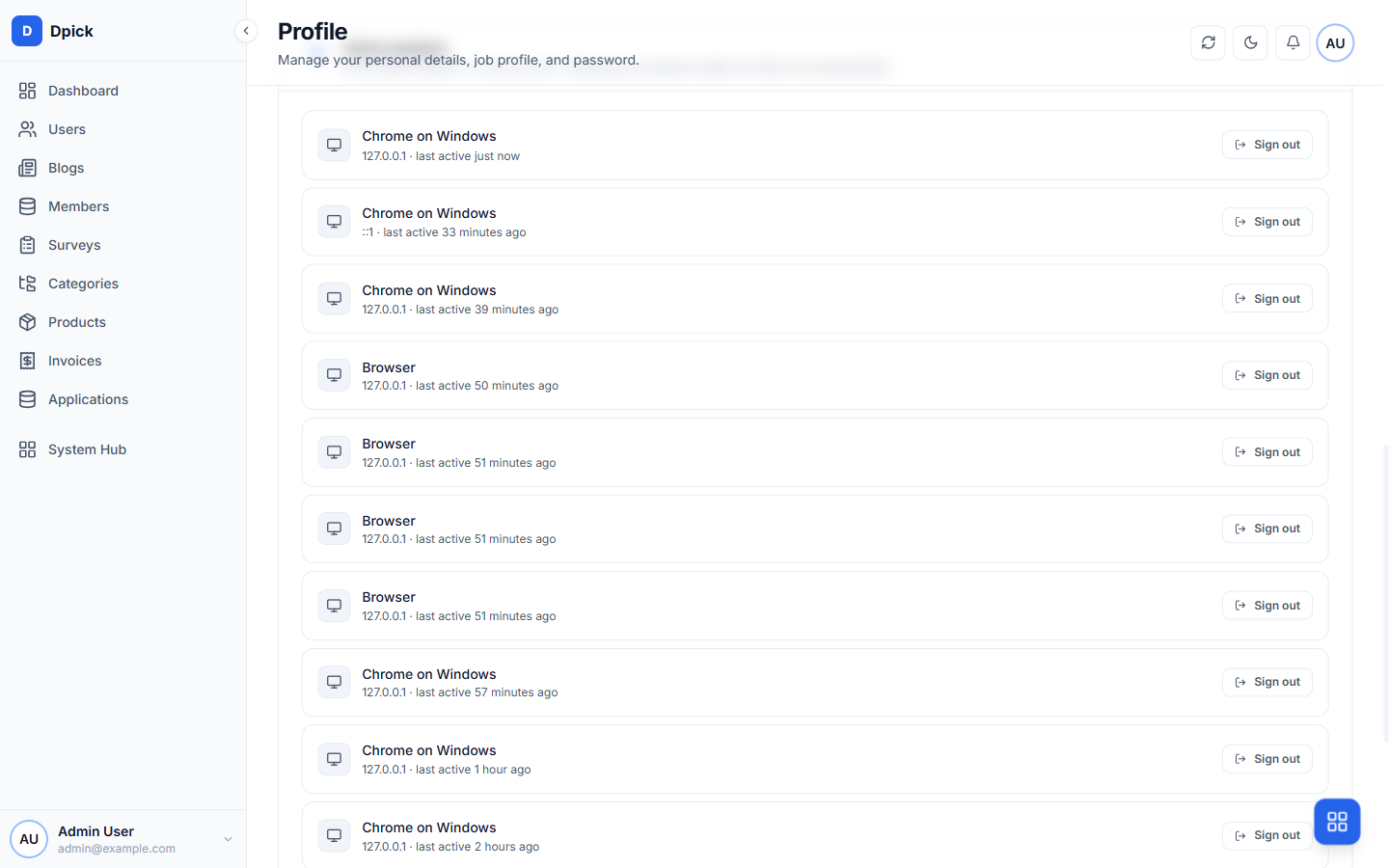
The admin panel renders all of this on /profile under “Active sessions”: each device with its browser, OS, IP and last activity, a badge on the current one, per-row sign-out, and a “sign out of all other devices” button. It is generated into your project at components/profile/active-sessions.tsx — yours to edit.
What revocation does not cover
Revocation bites at refresh time. An access token already in flight stays valid until it expires (15 minutes by default), because checking the database on every single request is the cost most teams are not willing to pay. If your threat model needs instant cut-off, shorten JWT_ACCESS_EXPIRY — that number is exactly your worst-case revocation lag.
Password Hashing
Passwords are hashed using bcrypt with the default cost factor (10). Hashing happens automatically via the GORM BeforeCreate hook on the User model. Passwords are never stored in plain text and are never returned in API responses (the Password field uses json:"-").
// Password field -- never included in JSON responsesPassword string `gorm:"size:255;not null" json:"-"`// Automatically hash on createfunc (u *User) BeforeCreate(tx *gorm.DB) error {if u.Password != "" {hashedPassword, err := bcrypt.GenerateFromPassword([]byte(u.Password), bcrypt.DefaultCost,)if err != nil {return err}u.Password = string(hashedPassword)}return nil}// Verify password during loginfunc (u *User) CheckPassword(password string) bool {err := bcrypt.CompareHashAndPassword([]byte(u.Password), []byte(password),)return err == nil}
Token Generation
The AuthService handles all token operations. It uses thegolang-jwt/jwt/v5 library with HMAC-SHA256 signing.
// GenerateTokenPair creates access + refresh tokens.func (s *AuthService) GenerateTokenPair(userID string, email, role string,) (*TokenPair, error) {accessToken, expiresAt, err := s.generateToken(userID, email, role, s.AccessExpiry,)if err != nil {return nil, fmt.Errorf("generating access token: %w", err)}refreshToken, _, err := s.generateToken(userID, email, role, s.RefreshExpiry,)if err != nil {return nil, fmt.Errorf("generating refresh token: %w", err)}return &TokenPair{AccessToken: accessToken,RefreshToken: refreshToken,ExpiresAt: expiresAt,}, nil}func (s *AuthService) generateToken(userID string, email, role string, expiry time.Duration,) (string, int64, error) {expiresAt := time.Now().Add(expiry)claims := &Claims{UserID: userID,Email: email,Role: role,RegisteredClaims: jwt.RegisteredClaims{ExpiresAt: jwt.NewNumericDate(expiresAt),IssuedAt: jwt.NewNumericDate(time.Now()),},}token := jwt.NewWithClaims(jwt.SigningMethodHS256, claims)tokenString, err := token.SignedString([]byte(s.Secret))if err != nil {return "", 0, err}return tokenString, expiresAt.Unix(), nil}
Password Reset Tokens
Password reset tokens are cryptographically random 32-byte hex strings. They are generated using Go's crypto/rand package, which is secure for this purpose.
// GenerateResetToken creates a random hex token for password resets.func GenerateResetToken() (string, error) {bytes := make([]byte, 32)if _, err := rand.Read(bytes); err != nil {return "", fmt.Errorf("generating reset token: %w", err)}return hex.EncodeToString(bytes), nil}// Output example: "a3f4b2c1e5d6f7890123456789abcdef..."// (64 hex characters = 32 bytes of randomness)
The reset flow
The token is never stored — only its SHA-256, in a password_reset_tokens row. A leak of that table cannot be used to reset anyone's password.
POST /api/auth/forgot-passwordissues a token, stores its hash, and emails a link to{OAUTH_FRONTEND_URL}/reset-password?token=…. Requesting a new link retires the previous one — otherwise every request would widen the window of usable tokens.POST /api/auth/reset-passwordconsumes the token, writes the new bcrypt hash, and revokes every session. The reason someone resets a password is to evict whoever they think is in the account; leaving that person signed in would defeat the exercise.
Tokens are single-use and expire after services.PasswordResetTTL (1 hour). Single use is enforced by one conditional UPDATE rather than a read-then-write, so two concurrent requests cannot both consume the same token.
It will not tell you who has an account
forgot-password returns the same 200 and the same message whether the address exists, the token fails to generate, or the email fails to send. Any variation would turn the endpoint into a directory of your users. Delivery failures are logged, never surfaced.
Identical wording is not enough on its own — a distinguishable response time is an oracle too. So everything past the initial lookup (minting the token, storing it, sending the mail) happens off the request path in a goroutine. Both branches do the same work before answering: parse the body, run one indexed SELECT, reply. Measured on a scaffolded app, the known and unknown response times overlap within noise; sending the mail inline made a known address roughly 3× slower.
Without a mailer configured
In development the reset link is written to the API log so you can complete the flow without an email provider. In production that is suppressed — a working reset token in a log file is a credential. Instead Grit logs a loud warning that RESEND_API_KEY is missing and nobody can complete a reset.
The landing page ships too: /reset-password in the admin panel reads the token from the query string, validates the new password, and sends the user back to sign in. A valid token with no page to land on is not a working feature.
Two-Factor Authentication (TOTP)
Every Grit project includes a complete two-factor authentication system using TOTP (Time-based One-Time Passwords). It works with any authenticator app: Google Authenticator, Authy, 1Password, Bitwarden, etc.
How It Works
Client Grit API| || POST /api/auth/login || { email, password } || -------------------------------->|| | Validate password ✓| | Check: TOTP enabled?| | Check: Trusted device cookie?| || If TOTP required: || { totp_required, pending_token }|| <--------------------------------|| || POST /api/auth/totp/verify || { pending_token, code, trust } || -------------------------------->|| | Validate TOTP code ✓| | (Optional) Set trusted device| { user, tokens } || <--------------------------------|
If the user has 2FA enabled and no trusted device cookie, the login endpoint returns a short-lived pending_token (5 minutes) instead of JWT tokens. The client then redirects to a TOTP verification page.
TOTP Endpoints
| Method | Endpoint | Auth | Purpose |
|---|---|---|---|
POST | /api/auth/totp/setup | JWT | Generate secret + QR code URI |
POST | /api/auth/totp/enable | JWT | Verify initial code, activate 2FA, get backup codes |
POST | /api/auth/totp/verify | Public | Exchange pending token + TOTP code for JWT |
POST | /api/auth/totp/backup-codes/verify | Public | Use backup code during login |
POST | /api/auth/totp/disable | JWT | Turn off 2FA (requires password) |
GET | /api/auth/totp/status | JWT | Check 2FA status, backup codes remaining |
POST | /api/auth/totp/backup-codes | JWT | Regenerate backup codes |
DELETE | /api/auth/totp/trusted-devices | JWT | Revoke all trusted devices |
Enabling 2FA (User Flow)
// Step 1: Get the secret and QR code URIconst { data } = await api.post('/api/auth/totp/setup')// data.secret = "JBSWY3DPEHPK3PXP..."// data.uri = "otpauth://totp/MyApp:user@email.com?secret=..."// → Show QR code to user (use a QR library to render data.uri)// Step 2: User scans QR code, enters the 6-digit code from their appconst { data: result } = await api.post('/api/auth/totp/enable', {secret: data.secret,code: '123456' // from authenticator app})// result.enabled = true// result.backup_codes = ["A1B2C3D4", "E5F6G7H8", ...]// → Show backup codes to user (they must save these!)
Login with 2FA (Client Flow)
// Step 1: Normal loginconst { data } = await api.post('/api/auth/login', { email, password })if (data.totp_required) {// Step 2: Redirect to TOTP verification page// Store the pending token temporarilyconst pendingToken = data.pending_token// Step 3: User enters 6-digit code from authenticator appconst { data: result } = await api.post('/api/auth/totp/verify', {pending_token: pendingToken,code: '123456',trust_device: true // optional: remember this device for 30 days})// result.user = { ... }// result.tokens = { access_token, refresh_token }} else {// No 2FA — normal login, tokens already returned// data.user = { ... }// data.tokens = { access_token, refresh_token }}
Backup Codes
When 2FA is enabled, 10 one-time-use backup codes are generated. Each code is individually bcrypt-hashed before storage. When a user enters a backup code during login, the used code is permanently removed from the database.
// During login, if user lost their authenticator app:const { data } = await api.post('/api/auth/totp/backup-codes/verify', {pending_token: pendingToken,code: 'A1B2C3D4', // one of the saved backup codestrust_device: false})// data.backup_codes_remaining = 9 (one code was consumed)
Trusted Devices
When trust_device: true is sent during TOTP verification, an HttpOnly cookie (totp_trusted) is set with a random token. The SHA-256 hash of this token is stored in the database with the user's IP and user agent. Trusted devices last 30 days with sliding expiry — each successful login refreshes the timer.
Users can revoke all trusted devices:
await api.delete('/api/auth/totp/trusted-devices')// All trusted device cookies are now invalid
Implementation Details
- Algorithm: HMAC-SHA1 (RFC 6238 / RFC 4226)
- Code length: 6 digits
- Period: 30 seconds
- Clock skew: ±1 window tolerance (90 second total window)
- Secret: 20 random bytes, base32-encoded (no padding)
- Pending tokens: 32 random bytes, hex-encoded, SHA-256 hashed for DB, expires in 5 minutes
- Backup codes: 8-character hex codes, individually bcrypt-hashed, one-time use
- Trusted device tokens: 32 random bytes, SHA-256 hashed, 30-day sliding expiry
- Dependencies: Zero external — uses only Go standard library +
golang.org/x/crypto/bcrypt
Signing in with a link
The sign-in page offers "Email me a sign-in link instead", using the address already typed in the email box. It is the only way in for an account that never had a password, which is every account created through Google or GitHub, and it satisfies WCAG 2.2's requirement (3.3.8) for a route past a cognitive test at sign-in.
POST /api/v1/auth/magic-link { "email": "..." } → always the same answerPOST /api/v1/auth/magic-link/consume { "token": "..." } → tokens, or a 2FA challenge
Three properties worth knowing
The request answers the same either way. "If that address has an account, a sign-in link is on its way", whether or not it does, and an address with no account does no work at all. Anything else turns the sign-in page into a way to enumerate who is registered. The one exception is the rate limit: a second request inside a minute is refused out loud, because the person is sitting in front of an inbox and silence would have them waiting for an email that is not coming.
The token is spent by the page, not by the link. Opening the link loads /magic-link in the admin, which POSTs the token back; the server spends nothing on the GET. Corporate mail scanners follow every URL in a message before anybody reads it, so a token spent on the GET is one the scanner burns: the person clicks their own link and is told it has already been used, with nothing in that message to suggest why.
A link replaces the password, not the second factor. An account with two-factor on gets the same challenge it always does, because a link sitting in a mailbox is exactly what a second factor exists to survive. Signing in this way records a session and an activity-log entry like any other, so the device appears under Devices and can be revoked.
Implementation Details
- Token: 32 random bytes, hex-encoded, stored only as a SHA-256 hash
- Life: 15 minutes (
services.MagicLinkExpiry) - Rate: one link per account per minute (
services.MagicLinkRate) - Single use: spending is a conditional update on
used_at IS NULL, so two tabs opening the same link cannot both succeed - Spent rows are kept: a second click is told the link was used rather than that it was invalid, which are different mistakes
- No mailer, no promise: a deployment that cannot send email refuses the request instead of claiming a link is on its way
Auth Configuration
All authentication settings are configured via environment variables:
# RequiredJWT_SECRET=change-this-to-a-long-random-string# Optional (defaults shown)JWT_ACCESS_EXPIRY=15m # Go duration formatJWT_REFRESH_EXPIRY=168h # 7 days# TOTP (Two-Factor Authentication)TOTP_ISSUER=MyApp # App name shown in authenticator apps (defaults to APP_NAME)
Important: The JWT_SECRET environment variable is required. The server will not start without it. Use a random string of at least 32 characters in production.