Scaffold a Go API and an Expo React Native app with one command. This guide covers prerequisites, project creation, the development workflow, and the device-vs-emulator API URL matrix so your phone can actually reach the backend.
One commandRunning on device
One command scaffolds the API and Expo app; point the phone at your LAN URL and go
Prerequisites
Make sure the following tools are installed before creating a mobile project. Go and Node power the monorepo; the Expo Go app and platform SDKs are what run the app on a phone or emulator.
Go1.21+
go version
Node.js18+
node --version
pnpm8+
pnpm --version
Grit CLILatest
grit --help
Expo GoiOS / Android
App Store / Play Store
EAS CLIFor builds
npm i -g eas-cli
To run the app on a physical device, install the free Expo Go app from the App Store or Google Play — no native toolchain required. To run on a simulator/emulator instead, install Xcode (iOS, macOS only) or Android Studio (Android, any OS). You only need the emulators if you want to test without a phone; Expo Go on a real device is the fastest path.
1
Scaffold the Project
Create a new mobile project with the Grit CLI. This generates a Turborepo monorepo with the full Go backend in apps/api, an Expo React Native app in apps/expo, and shared Zod schemas and TypeScript types in packages/shared.
Terminal
$grit new myapp --mobile
--mobile is shorthand for --arch=mobile. Both produce the same result. If you already have another architecture and want to add Expo alongside it, use the --expo flag instead:
Terminal
$grit new myapp --mobile # Go API + Expo app
$grit new myapp --arch=mobile # identical to --mobile
$grit new myapp --arch=triple --expo # web + admin + API, plus Expo
2
Project Structure
The Expo app lives at apps/expo and uses Expo Router for file-based navigation — the same mental model as the Next.js App Router, but for native screens. Files under app/ become screens; the (tabs)/ group is the tab bar.
You need two processes running: the Go API and the Expo dev server. From the project root, grit start launches everything in parallel, or you can run each app on its own.
Terminal
$cd myapp
$grit start # Go API + every frontend app (incl. Expo) in parallel
$grit start server # Go API only → http://localhost:8080
$grit start expo # Expo dev server only (runs `expo start` in apps/expo)
Under the hood, grit start expo runs expo start in apps/expo. Expo prints a QR code and starts Metro (the JS bundler) on port 8081. Leave the Go API running on 8080 in a second terminal so the app has a backend to talk to.
First launch installs Expo dependencies and warms the Metro cache, so it takes a moment. Subsequent starts are fast.
4
Expo · Android
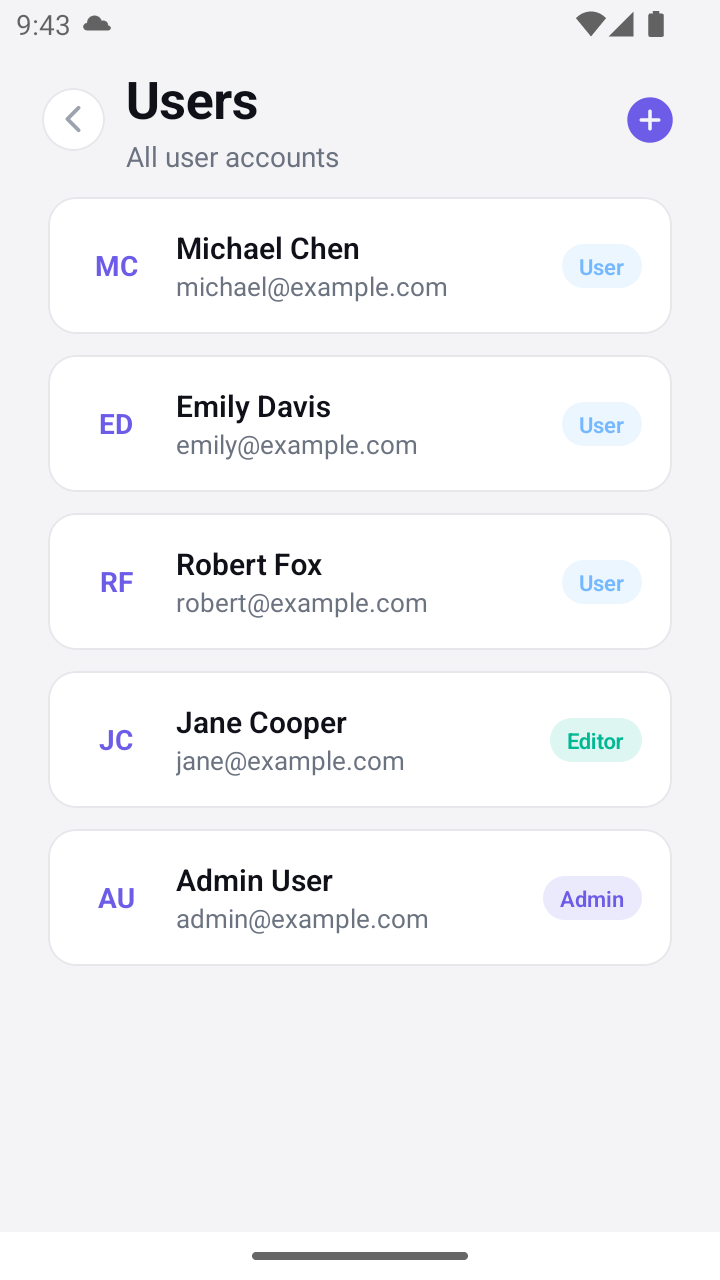
A generated resource on the phone, reading the same Go API the admin panel does — same five records, same roles. The generated hook is shared; only the primitives differ.Point the App at the API
The single biggest gotcha in mobile development: localhost on a phone means the phone itself, not your dev machine. Grit's scaffolded lib/api.ts resolves the right host automatically, so you rarely edit anything — but it helps to know the rules.
Target
Base URL used
Why
iOS simulator
http://localhost:8080/api
Shares the host machine’s network
Android emulator
http://10.0.2.2:8080/api
10.0.2.2 is the emulator’s alias for the host
Physical device (Expo Go)
http://<machine-LAN-IP>:8080/api
Derived from the host Metro is served on
Any target (override)
EXPO_PUBLIC_API_URL
Wins if set — e.g. a deployed backend
Here is the resolver Grit ships in lib/api.ts. On a physical device it reads the LAN host the phone already used to reach Metro — so it just works over Wi-Fi without you hard-coding an IP:
apps/expo/lib/api.ts
constAPI_PORT=8080;
functionresolveApiUrl():string{
// 1. An explicit env var always wins (e.g. a deployed backend).
// 3. Fall back to the platform loopback (simulator / web).
return Platform.select({
android:"http://10.0.2.2:"+API_PORT+"/api",
default:"http://localhost:"+API_PORT+"/api",
})asstring;
}
Deploying? Set EXPO_PUBLIC_API_URL=https://api.yourapp.com in the environment and the resolver uses it verbatim (appending /api). That is how release builds reach your production backend instead of a LAN IP.
5
Run It on Your Phone
Start the Go API: grit start server (leave it running).
Start Expo: grit start expo — a QR code appears in the terminal.
Open Expo Go on your phone and scan the QR code (iOS: Camera app; Android: the Expo Go scanner).
The app bundles and opens. Register an account, or log in with the seeded admin (admin@example.com / admin123).
Phone and computer must be on the same Wi-Fi network. If the app hangs on the splash screen, the API URL is usually the culprit — confirm the Go API is reachable at your machine's LAN IP on port 8080. Grit's client fails fast after 15s rather than hanging indefinitely.